Mostrando del 1 al 10 de 764 registros
Az2 programa informático para facturación y control de inventario, red inalámbrica, cuentas por pagar, cuentas por cobrar, facturas de compras, ventas, notas de crédito, notas de débito. Para sistemas operativos windows
A5AD (Asincoade) es un programa informático para control de inventarios y facturación por Internet. Trabajo a distancia. Compas, Ventas, Notas de Crédito, Notas de Débito, Cuentas por Pagar, Cuentas por Cobrar, Otros Ingresos, Otros Egresos. WiFi. Red. Windows 7, 8 y 10.
Este algoritmo recolecta las URL, o direcciones web, que el humano desee y las almacena en un archivo. El algoritmo, además de la dirección, también agrega el nombre de la URL (MiURL) y el grupo (Varios), ambos datos por defecto. El humano puede después corregir el nombre y el grupo. Puede agregar nuevos grupos. Puede mostrar las direcciones web por grupo. Puede eliminar una dirección, un grupo o todas las direcciones. Puede ordenar las direcciones por grupo o por nombre.
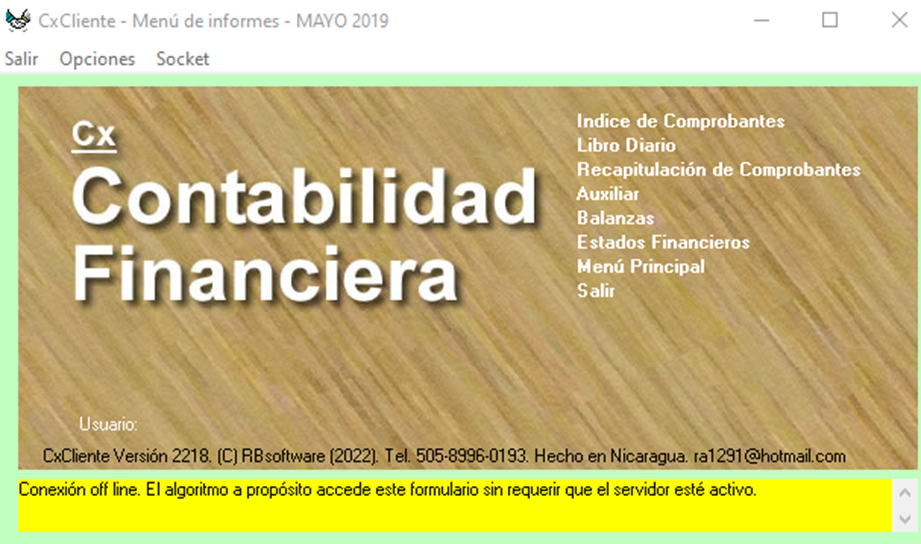
Cx es un programa para Windows.
Sirve para gestionar la contabilidad.
Produce: libro diario, auxiliar,
balanzas, recapitulación, estados financieros,
balance general, estado de pérdidas y ganancias,
estado de resultados y estados de cuentas.
Servosistema que administra
la oficina sin papeles.
Multiusuario cliente/servidor, red inalámbrica.
Código abierto. Trabajo a distancia.
Adjunto Cx Guía del rey de la creación

Public Class Form4
Dim T, Ru, A0, B0, a, b, c, V, M, vem, vem2, R1, R2, R3, R4, R5, R6, R7, R8, Var As Double
Private Sub Form4_Load(sender As Object, e As EventArgs) Handles MyBase.Load
TextBox1.Text = ""
TextBox2.Text = ""
Label5.Text = ""
ComboBox2.Text = "m3/kg"
ComboBox3.Text = "K"
ComboBox4.Text = "Kpa"
End Sub
Private Sub ComboBox4_SelectedIndexChanged(sender As Object, e As EventArgs) Handles ComboBox4.SelectedIndexChanged
ComboBox4.DropDownStyle = ComboBoxStyle.DropDownList
If ComboBox4.Text = "Kpa" Then
Label5.Text = R7
Label5.Text = Math.Round(Convert.ToDouble(R7), 4)
ElseIf ComboBox4.Text = "Pascal" Then
Label5.Text = R7 * 1000
Label5.Text = Math.Round(Convert.ToDouble(R7 * 1000), 4)
ElseIf ComboBox4.Text = "Atmosfera" Then
Label5.Text = R7 / 101.3
Label5.Text = Math.Round(Convert.ToDouble(R7 / 101.3), 4)
ElseIf ComboBox4.Text = "Bar" Then
Label5.Text = R7 / 100
Label5.Text = Math.Round(Convert.ToDouble(R7 / 100), 4)
ElseIf ComboBox4.Text = "Psi" Then
Label5.Text = R7 / 6.895
Label5.Text = Math.Round(Convert.ToDouble(R7 / 6.895), 4)
End If
End Sub
Private Sub Button2_Click(sender As Object, e As EventArgs) Handles Button2.Click
TextBox1.Text = ""
TextBox2.Text = ""
Label5.Text = ""
ComboBox2.Text = "m3/kg"
ComboBox3.Text = "K"
ComboBox4.Text = "Kpa"
Label5.Text = ""
End Sub
Private Sub ComboBox1_SelectedIndexChanged(sender As Object, e As EventArgs) Handles ComboBox1.SelectedIndexChanged
ComboBox1.DropDownStyle = ComboBoxStyle.DropDownList
If ComboBox1.Text = "Nitrógeno" Then
A0 = 136.2315
B0 = 0.05046
a = 0.02617
b = -0.00691
c = 42000
M = 28.013
Ru = 8.314
ElseIf ComboBox1.Text = "Hidrógeno" Then
A0 = 20.0117
B0 = 0.02096
a = -0.00506
b = -0.04359
c = 504
M = 2.015
Ru = 8.314
ElseIf ComboBox1.Text = "Argón" Then
A0 = 130.7802
B0 = 0.03931
a = 0.02328
b = 0.0
c = 59900
M = 39.984
Ru = 8.314
End If
End Sub
Private Sub TextBox1_TextChanged(sender As Object, e As EventArgs) Handles TextBox1.TextChanged
If ComboBox2.Text = "m3/kg" Then
V = Val(TextBox1.Text)
ElseIf ComboBox2.Text = "cm3/g" Then
V = Val(TextBox1.Text) * 1000
ElseIf ComboBox2.Text = "ft3/lb" Then
V = Val(TextBox1.Text) * 16.01846337
ElseIf ComboBox2.Text = "in3/Oz" Then
V = Val(TextBox1.Text) * 1729.994044
End If
End Sub
Private Sub Button1_Click(sender As Object, e As EventArgs) Handles Button1.Click
Var = False
If ComboBox1.Text = "" Then
MessageBox.Show("Escoge el gas")
Var = True
ElseIf TextBox1.Text = "" Then
MessageBox.Show("Introduce el volumen")
Var = True
ElseIf TextBox1.Text <= 0 Then
Label5.Text = ""
MsgBox("Error, Proporciona un volumen mas alto")
Var = True
'Label5.Visible = False
ElseIf TextBox2.Text = "" Then
MessageBox.Show("Introduce la tempertura")
Var = True
ElseIf TextBox1.Text = "" Then
MessageBox.Show("Introduce el volumen")
Var = True
End If
If Var = False Then
If ComboBox3.Text = "K" Then
Label5.Text = ""
If TextBox2.Text < 60 Or TextBox2.Text > 300 Then
MessageBox.Show("error el rango de la T debe ser >60 y <300 K")
Var = True
Else
T = Val(TextBox2.Text)
End If
ElseIf ComboBox3.Text = "C" Then
If TextBox2.Text < -213.15 Or TextBox2.Text > 26.85 Then
MessageBox.Show("error el rango de la T debe ser >-213.15 y <26.85 C")
Var = True
Else
T = Val(TextBox2.Text) + 273.15
End If
ElseIf ComboBox3.Text = "F" Then
If TextBox2.Text < -351.67 Or TextBox2.Text > 80.33 Then
MessageBox.Show("error el rango de la T debe ser -351.67 y 80.33 F")
Var = True
Else
T = ((TextBox2.Text - 32) / 1.8) + 273.15
End If
End If
End If
If Var = False Then
vem = V * M
vem2 = vem ^ 2
R1 = A0 * (1 - (a / vem))
R2 = B0 * (1 - (b / vem))
R3 = (Ru * T) / (vem2)
R4 = 1 - (c / (vem * T ^ 3))
R5 = vem + R2
R6 = R1 / vem2
R7 = R3 * R4 * R5 - R6
If R7 < 0 Then
Var = True
MsgBox("Error, la presiòn resultante no debe ser negativa")
Else
Label5.Text = R7
Label5.Text = Math.Round(Convert.ToDouble(R7), 4)
End If
End If
ComboBox4.SelectedIndex = 0
End Sub
Private Sub ComboBox2_SelectedIndexChanged(sender As Object, e As EventArgs) Handles ComboBox2.SelectedIndexChanged
If ComboBox2.Text = "m3/kg" Then
V = Val(TextBox1.Text)
ElseIf ComboBox2.Text = "cm3/g" Then
V = Val(TextBox1.Text) * 1000
ElseIf ComboBox2.Text = "ft3/lb" Then
V = Val(TextBox1.Text) * 16.01846337
ElseIf ComboBox2.Text = "in3/Oz" Then
V = Val(TextBox1.Text) * 1729.994044
End If
End Sub
Private Sub ComboBox1_KeyPress(sender As Object, e As KeyPressEventArgs) Handles ComboBox1.KeyPress
e.Handled = True
End Sub
Private Sub ComboBox4_KeyPress(sender As Object, e As KeyPressEventArgs) Handles ComboBox4.KeyPress
e.Handled = True
End Sub
Private Sub TextBox2_KeyPress(sender As Object, e As KeyPressEventArgs) Handles TextBox2.KeyPress
If Not Char.IsDigit(e.KeyChar) AndAlso Not Char.IsControl(e.KeyChar) AndAlso e.KeyChar <> "." AndAlso e.KeyChar <> "-" Then
e.Handled = True
End If
If e.KeyChar = "."c AndAlso TextBox2.Text.Contains(".") Then
e.Handled = True
End If
If e.KeyChar = "0"c AndAlso TextBox2.Text = "0" Then
e.Handled = True
End If
If e.KeyChar = "-"c AndAlso TextBox2.Text.Contains("-") Then
e.Handled = True
End If
End Sub
Private Sub TextBox3_KeyPress(sender As Object, e As KeyPressEventArgs)
If (Not Char.IsDigit(e.KeyChar) AndAlso e.KeyChar <> "." AndAlso e.KeyChar <> ControlChars.Back) Then
e.Handled = True
End If
End Sub
Private Sub TextBoxt1_KeyPress(sender As Object, e As KeyPressEventArgs) Handles TextBox1.KeyPress
If (Not Char.IsDigit(e.KeyChar) AndAlso e.KeyChar <> "." AndAlso e.KeyChar <> ControlChars.Back) Then
e.Handled = True
End If
If e.KeyChar = "."c AndAlso TextBox1.Text.Contains(".") Then
e.Handled = True
End If
If e.KeyChar = "0"c AndAlso TextBox1.Text = "0" Then
e.Handled = True
End If
End Sub
Private Sub Label1_Click(sender As Object, e As EventArgs) Handles Label1.Click
End Sub
Private Sub Label2_Click(sender As Object, e As EventArgs) Handles Label2.Click
End Sub
Private Sub Label4_Click(sender As Object, e As EventArgs) Handles Label4.Click
End Sub
Private Sub TextBox2_TextChanged(sender As Object, e As EventArgs) Handles TextBox2.TextChanged
If ComboBox3.Text = "K" Then
T = Val(TextBox2.Text)
ElseIf ComboBox3.Text = "C" Then
T = Val(TextBox2.Text) + 273.15
ElseIf ComboBox3.Text = "F" Then
T = Val(TextBox2.Text) - 32 * (5 / 9) + 273.15
ElseIf T > 60 Then
MessageBox.Show("ERROR NUMERO NO VALIDO")
ElseIf T < 300 Then
MessageBox.Show("ERROR NUMERO NO VALIDO")
End If
End Sub
Private Sub Button3_Click(sender As Object, e As EventArgs) Handles Button3.Click
Close()
End Sub
End Class